Tuesday, September 22, 2009

2.5D

learn a technical term:

what is 2.5D?
2.5 D means 2D graphics manipulated to provide 3D effect. the graphics is not actual 3D but 2D, programmed in such a way to make the user think the scene is in 3D

Examples:
increasing the size of an object makes it look like the camera is moving towards the object

placing billboards of texture at different sizes gives a feeling of depth. for e.g placing grass blades at different sizes give a feel of whole grass plains

why 2.5D?
3D graphics computation is expensive in terms of time and memory. hence create 2.5D to give cheap 3D effects, and making the human brain think that the scene is 3D

games using 2.5D:
Outrun (1986), the car moves in a single direction, while palm trees on left and right side of road are placed at different sizes to simulate depth.

Sonic the Hedgehog for the Sega Mega Drive (Sega Genesis in the US) uses parallax scrolling (placing different 2d background images as different layers, to create 3d effects)

Nvidia's PhysX

I am developing a game for one of my courses, and for that I am planning to create a physics world. Well why? you may ask. i dint come across a game that did not use any sort of physics engine especially when it is a physics based tower building game.

So I am researching different physics engines like box2D, bullet and Nvidia's Physx.
Here is what should be done to install and use Physx in Windows Vista from scratch. I have sequenced the steps after many trial and error operation on my computer as decribed after this section.

1. update drivers through laptop manufacturer, as folows:
computer->properties->device manager->display adapter->update driver.
Mine was Dell with windows vista

2.nvidia does not seem to give drivers for laptops, it provides drivers only for desktop, or so i heard. Scan your system for nvidia recommended driver by going to nvidia download driver home page, and using option 2. This option works only in IE/firefox. Download and install whatever driver package that nvidia suggests for your computer.

3.installing the nvidia driver automatically installs physx system software, so no need to do it seperately. however if you still want to manually install it for some reason, then go to http://www.nvidia.com/object/physx_9.09.0814.html to install physx system software

4. install physx sdk from http://developer.nvidia.com/object/physx_downloads.html

5.goto programs->nvidia corporation ->physics control panel, and see if demo works fine on your system. or run physx viewer to see if it runs properly on your system.

-----------------------------------------------------------------------------

Here is what i did to install and try out the Physx sdk 2.8.1 in Windows Vista.

1. install physics system software v9.09

2. install phsyx sdk v 2.8.1

after installing both softwares, I went to Physx control panel only to see the following screen.
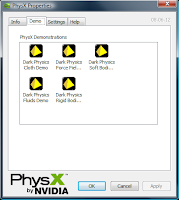
Demo:
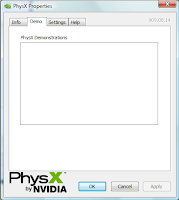
which should look something like this
The settings tab looked like this
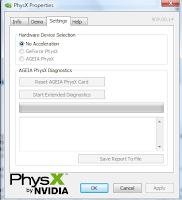
which should have looked something like this since i have Geforce 8400 MX video card
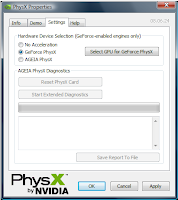

hence i went to http://www.nvidia.com/Download/index.aspx?lang=en-us to install nvidia drivers for vista v190.62, since obviously they are missing in my system.
But during setup the following problem occurred
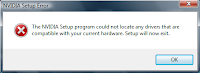

After researching the net, i found out that the drivers first has to be installed through Dell's website for some weird reason. Hence went to computer->properties->device manager, and right clicked display card to select "update device driver"
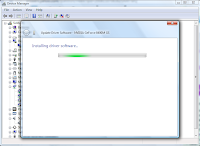


after the driver got updated through Dell, i restarted my system, and ran nvidia driver installation package again to get the same error, but this time after the setup exited, it gave me option to "install using recommended settings" which i selected. It gave me the following error.

researching the net, i found that nvidia drivers are for desktop machines, and not for laptops. for laptops, the drivers has to be installed through manufacturers, which i already did. so why did it not give me support for physx yet?
I did a system scan from the driver download page of nvidia, to see what it suggests for my system, and if it is different from the one i tried to install.
the results as shown in image below

image

indicate that my system needs version 186.81 drivers. I downloaded the exe file (which took more than 30 mins to get downloaded), and ran it. luckily it did not give any error, and installed required drivers on my machine. Then i restarted the system, and ran physx control panel to see Nvidia's control panel working properly. Then i ran physxviewer and it also ran properly. yay. now i can play with my physx.

Wednesday, August 12, 2009

Mingw + DirectX

I am currently a student at University of Illinois, Chicago doing masters in Computer Science with focus on graphics programming. I decided to learn directx and what could be a better way to do that other than programming it?. I have microsoft Visual c++ installed on my system. But I am a big fan of g++. Hence I decided to do a small project with directx graphics and mingw compiler.

Trouble starts here. There is very little information on the internet about combining directX and mingw. Most of the users seem to use DevCPP or visual c++. Anyways without losing hope, I searched and found this useful website by link. Having this page as foundation I started the installation process. I thought to myself "what if there is little or no information about this topic on the net? I will experiment and write a blog about it" and here it goes.

I already have mingw's latest version. To learn more about Mingw with Opengl please visit my "Mingw + glsl" blog. I also have mingw utilities to use the reimp tool. Now reimp tool is used to convert *.lib files to Mingw compatible *.a files.

Next I downloaded directx sdk for windows Vista ( And yeah I have Vista) . Installed directx to C:\Program Files\Microsoft DirectX SDK (March 2009). Now to make directx libraries compatible with Mingw, I used reimp tool to convert all the *.lib files of C:\Program Files\Microsoft DirectX SDK (March 2009)\Lib\x64 to *.a files. I moved those reimp'ed files from to C:\MinGW\lib\directx. Created a new folder directx under lib for directx libraries.

Then I moved header files (*.h) files from C:\Program Files\Microsoft DirectX SDK (March 2009)\Include to C:\MinGW\include\directx. Directx folder will not be there under include, so created one.

Now in the program, include the header file as #include and while running compile command include the library as -ld3d9 for e.g:
g++ demo.cpp -ld3d9

I ran my first directX "hello world" sorta program from http://www.directxtutorial.com/ and it compiled and ran successfully. looking forward to learn more about DirectX

hope this piece of information helps you with g++ and DirecX combination.


Friday, July 31, 2009

slist: No such file or directory

Error:
slist: No such file or directory

code:
#include

Environment:
Mingw’s g++ compiler

Solution:
Copy slist file from C:\MinGW\include\c++\3.4.5\ext to C:\MinGW\include\c++\3.4.5

Explanation:
Slist belong to extension, if you want to use slist in your program, you have to have the file in your include directory. Otherwise in the program you might have to give #include .

Saturday, March 21, 2009

Galaxy commander game

As a part of video game course, we (team of 4) are developing a video game for multi touch table. this game is similar to galcon: galaxy conquest. fast action packed game now available for iPhone also.

To know more about our game development, please visit http://sites.google.com/site/tuffpanda

btw our game company of 4 is named as Tuffpanda Games :)

here is a video of our finished game displayed at Tactile - a multi-touch multi-user table built at Electronic Visualization lab at UIC, chicago

Monday, December 15, 2008

My Projects

Hi,

this is a link to a website, where i have uploaded my recent projects and relevant codes and project description. please view them if you are interested

http://suja.synthasite.com/index.php

Monday, October 13, 2008

glsl with mingw

GLSL Installation on windows vista (32bit)

This installation direction is for installing opengl shading language with windows vista using mingw


opengl support for vista

1)download the current drivers for your graphics card from www.support.dell.com, to fully use the hardware acceleration of your graphics card.

2)check in c:/windows/system32/ for opengl32.dll, glut32.dll. They will be automatically installed in vista. If not, install the driver from support.dell.com.

mingw installation

3)install mingw (if u dont want to go through the trouble of visual studio usage, or you are comfortable with command line usage, like me :) ) from http://sourceforge.net/project/showfiles.php?group_id=2435 (automated mingw installer). run the file, and it will do the work for you.

4)from the same url, install mingw utilities. it has reimp command which is used to convert *.lib files to *.a files. tar.gz files can be extracted in windows using a freeware 7-zip which could be installed from http://www.ofzenandcomputing.com/zanswers/1072

glut installation

5)http://mywebpage.netscape.com/PtrPck/glut.htm install glut from this page, and use reimp to convert glut32.lib to libglut32.a.
Command: /mingw-utils/bin>> reimp.exe glut32.lib
copy this libglut32.a file to mingw/lib directory, and replace the old libglu32.a file. The old files gives out some "undefined reference to `__glutInitWithExit@12'" errors, which the new file eliminates.Copy the dll file to c:\windows\system32 and .h files from GL/ to c:/mingw/include/GL/

msys installation

6)run msys.exe file from http://prdownloads.sourceforge.net/mingw/MSYS-1.0.10.exe?download to install msys. msys is used to build glew from the source, since using glew binaries for windows gives out errors of the form "undefined reference to `_imp____glewGetShaderiv'". installation process will ask for mingw path. give the full path c:\mingw or whichever path mingw is installed in. msys will get installed into path/msys/1.0. Run the msys batch file. this is a shell program.

glew installation

7)download glew source file,(latest:1.5.0, has support for opengl 2.0, which inturn as support for glsl 1.2) zip file from http://glew.sourceforge.net/, and extract the folder to somewhere inside /msys/1.0. open msys shell program (batch file), and Go to the folder where the makefile in glew directory is present. cd /home/glew. Run the command: make

now copy the GL/glew.h, glxew.h, wglew.h to mingw/include/GL/ folder. copy lib/libglew32.a, libglew32.dll.a files to mingw/lib. copy glew32.dll to c:/windows/system32 folder.

thats all folks. your opengl shader program should compile and execute beautifully in windows vista.

other links


for furthur information please go through the following links

about opengl installation: http://www.opengl.org/wiki/index.php/Getting_started
about opengl usage: http://www.dgp.toronto.edu/~mjmcguff/learn/opengl/
about mingw setup: http://www.jumpstation.co.uk/info/mingw_setup_guide.html